THE PLATFORM’S DEVELOPMENT RECORD
Technology with a documented foundation.
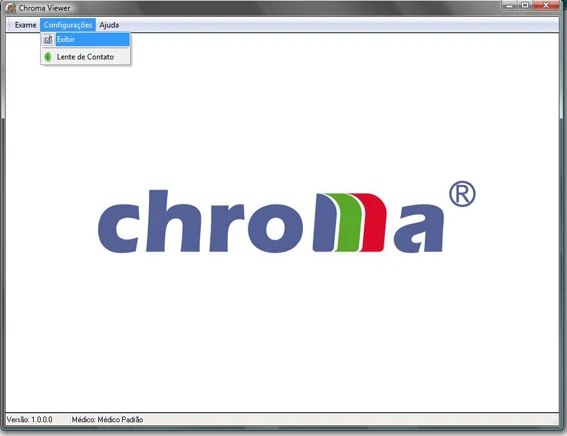
The CHROMA Viewer module extended access to the examination database through local or network connections. The program's opening screen provided access through Settings, then Display.
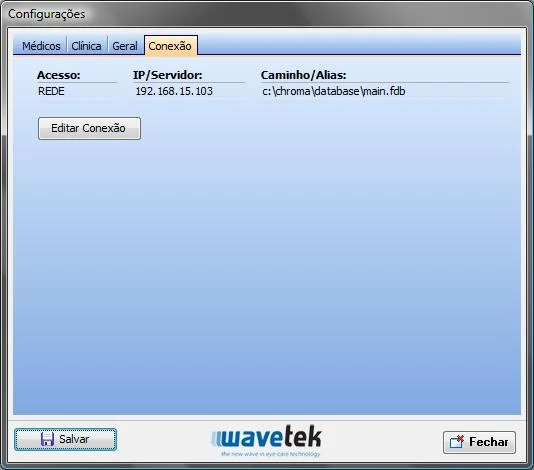
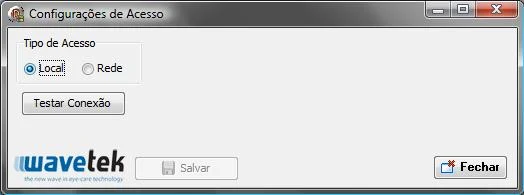
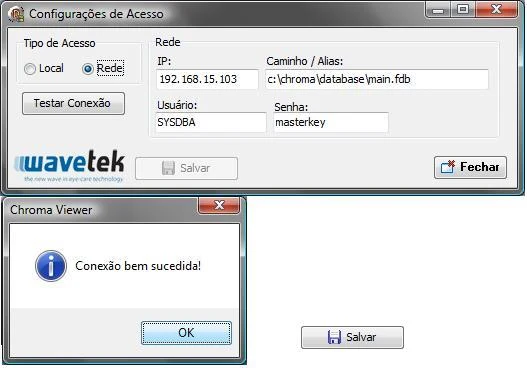
Settings included tabs for Clinicians, Clinic, General and Connection. Choosing Edit Connection opened the access settings, where the user could test a connection and decide whether to save it.
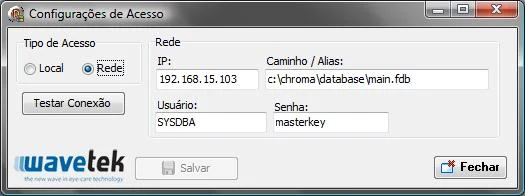
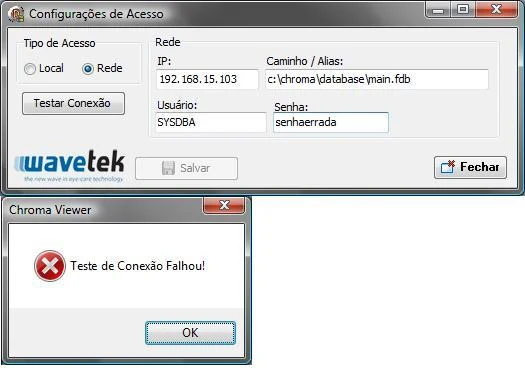
The user could select a local database or a network connection. A network connection required the database IP address, path or alias, together with a username and password. A successful connection test enabled saving the configuration. If the database could not be found, the software displayed a warning and prevented the invalid configuration from being saved, helping ensure that the next program launch used a working connection.
Instrument, imaging & software gallery
BROCHURES / VIDEOS / SCIENTIFIC REFERENCES
Explore Chroma Viewer.
English user manuals & guides
Technical-review editions of the full original instructions. Source differences and legacy interface labels are identified inside each document.
Instrument videos & recorded coverage
Related scientific publications
Foundational research related to this field. These articles are not clinical validation of a future instrument configuration.
Keratoconus prediction using a finite element model of the cornea with local biomechanical properties.
CARVALHO, LA ; PRADO, M. ; CUNHA, R. H. ; COSTA, A. ; PARANHOS JR, A. ; Schor ; Chamon .
Read the journal / DOI source ↗[Preliminary results of a wide-angle corneal topography system for Placido-based videokeratographers].
CARVALHO, LA .
Read the journal / DOI source ↗Neural networks and statistical analysis for classification of corneal videokeratography maps based on Zernike coefficients: a quantitative comparison
CARVALHO, LA ; BARBOSA, M.
Read the journal / DOI source ↗Mumford–Shah algorithm applied to videokeratography image processing and consequences to refractive power values
FLORINDO, J. B. ; SOARES, S. H. M. ; CARVALHO, LA ; Bruno . MUMFORD-SHAH ALGORITHM APPLIED TO VIDEOKERATOGRAPHY IMAGE PROCESSING AND CONSEQUENCES TO REFRACTIVE POWER VALUES.
Read the journal / DOI source ↗Desenvolvimento e resultados preliminares de um sistema para topografia da córnea utilizando iluminação através de fenda retangular estreita
CARVALHO, LA .
Read the journal / DOI source ↗A precise computer simulation system for rigid contact lens (PMMA) adaptation using in vivo data from corneal topography
CARVALHO, LA .
Read the journal / DOI source ↗[Techniques for facilitating in vivo corneal topography diagnosis].
CARVALHO, LA .
Read the journal / DOI source ↗Preliminary Results of Neural Networks and Zernike Polynomials for Classification of Videokeratography Maps
CARVALHO, LA .
Read the journal / DOI source ↗Spatial and frequency domain techniques for segmentation of Placido images and accuracy implications for videokeratography
CARVALHO, LA .
Read the journal / DOI source ↗Absolute accuracy of Placido-based videokeratographs to measure the optical aberrations of the cornea.
CARVALHO, LA .
Read the journal / DOI source ↗On the absolute accuracy of Zernike polynomials to characterize the corneal surface and the optical aberrations of the human eye
CARVALHO, LA .
Read the journal / DOI source ↗Videokeratoscopes for dioptric power measurement during surgery.
CARVALHO, LA ; STEFANI, M
Read the journal / DOI source ↗Videokeratograph (VKS) for monitoring corneal curvature during surgery
CARVALHO, LA ; Romão ; Tonissi ; Yasuoka ; Castro ; Schor ; Chamon .
Read the journal / DOI source ↗Desenvolvimento de um instrumento computadorizado para medida do poder refrativo da córnea (videoceratógrafo)
CARVALHO, LA .
Read the journal / DOI source ↗Computer Algorithm for Simulation of the Human Optical System and Contribution of the Cornea to the Optical Imperfections of the Eye
CARVALHO, LA .
Read the journal / DOI source ↗Development of a computerized instrument for evaluating human corneal curvature
CARVALHO, LA ; PARANAGUA, E. ; SANTOS, L. E. R. ; Tonissi ; Romão ; Oliveira ; Yasuoka ; Castro .
Read the journal / DOI source ↗Development of a computerized instrument for evaluating human corneal curvature
CARVALHO, LA ; SOUZA, S. J. F. E. ; Castro .
Read the journal / DOI source ↗